Sep 2, 2026News & Insights
Installation and Maintenance Guidelines for LCD Bar Displays
Correct installation protects image quality, reliability, and service access. Before mounting any LCD bar display, verify the wall or structure, display weight, bracket rating,...
Installation and Maintenance Guidelines for LCD Bar Displays
Correct installation protects image quality, reliability, and service access. Before mounting any LCD bar display, verify the wall or structure, display weight, bracket rating, ventilation clearance, cable route, power supply, and local safety requirements.
Wall-Mounted Installation
Use mounting points and a bracket specified for the display. Confirm that the wall can carry the equipment and any dynamic load. Keep the screen level, avoid twisting the enclosure, and leave enough space for ventilation and future cable access.
Suspended Installation
Suspended displays require rated hardware, secure attachment points, and secondary safety restraint where applicable. Check the ceiling structure rather than relying on decorative panels. Route power and signal cables so they do not carry the screen's weight or create a snagging hazard.
Embedded Installation
An embedded bar display should not be clamped tightly into an opening. Allow manufacturing tolerance, thermal expansion, ventilation, and a practical removal path. If the front must be flush, coordinate the bezel, cover glass, and access panels before production.
Shelf-Edge Installation
Shelf installations must preserve product access and customer safety. Protect connectors from impact, secure cables away from merchandise, and confirm that the shelf does not trap heat around the display. Content should be designed for the viewing distance and the panel's native resolution.
Routine Maintenance
Disconnect power before physical inspection. Clean the surface with a soft, lint-free cloth and an approved cleaner; do not spray liquid directly onto the panel. Periodically check mounting hardware, ventilation openings, cable strain, connectors, image uniformity, and operating temperature. Maintain a content and configuration backup so a failed player or control board can be restored efficiently.
Complete a Site Survey Before Mounting
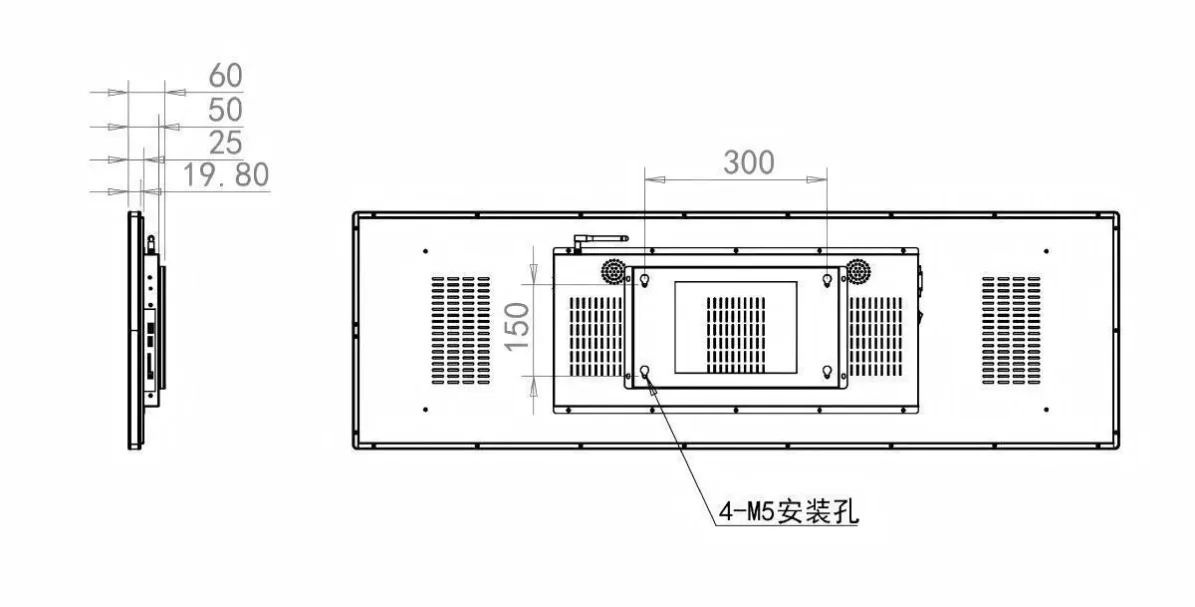
A site survey should record the supporting surface, bracket position, screen orientation, viewing height, ambient light, nearby heat sources, cable route, network availability, and maintenance access. Compare the actual enclosure dimensions with the proposed opening or fixture; the visible panel size alone does not include connectors, ventilation space, mounting hardware, or the room needed to remove a rear cover.
Confirm that the structure can carry the display and bracket with an appropriate safety margin. Ceiling and overhead installations require particular attention to approved anchors, secondary retention where applicable, and local safety requirements. Power and data cables should not carry the display’s weight or remain sharply bent behind the enclosure.
Turn Maintenance Into a Repeatable Schedule
Routine inspection can include image quality, startup behavior, ventilation openings, fan noise if fitted, cable condition, bracket security, clock and schedule accuracy, network status, and the cleanliness of exposed surfaces. The frequency should reflect operating hours, dust, public access, vibration, and temperature rather than following one universal interval.
Keep a record of symptoms, cleaning dates, firmware changes, replaced parts, and recurring network or power events. Disconnect power and follow the manufacturer’s procedure before opening the enclosure. A consistent maintenance history makes intermittent faults easier to diagnose and reduces unnecessary replacement of panels or control boards.